10b_GM_Drums.zip
Description
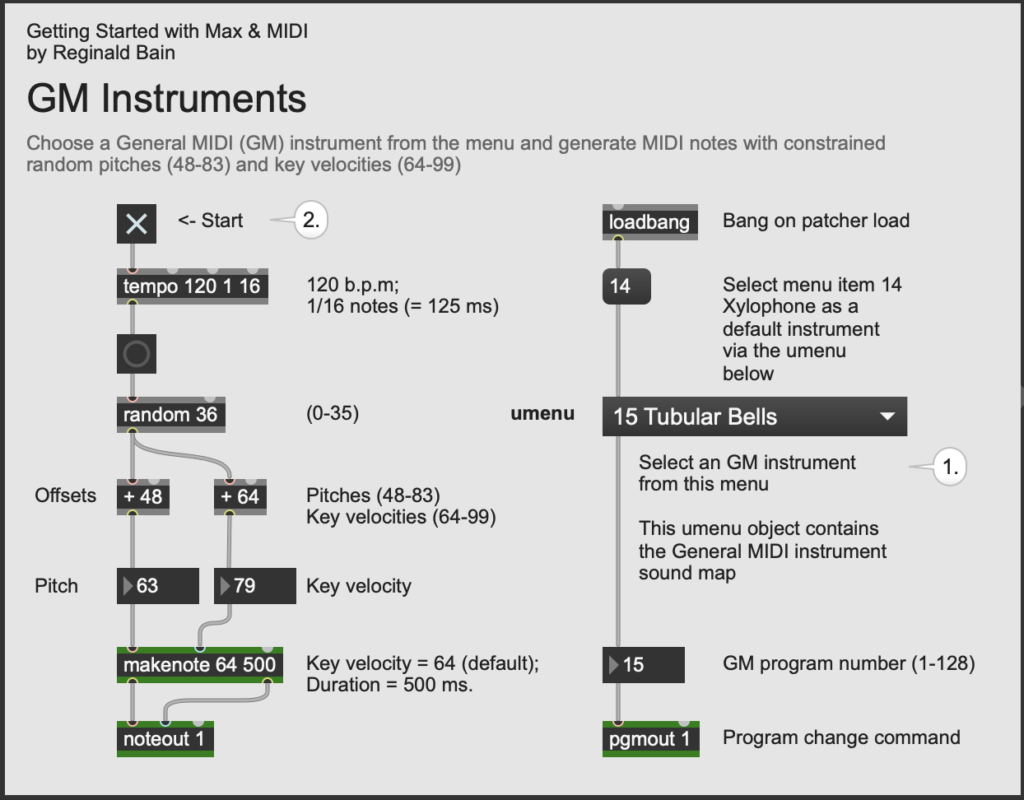
This patcher demonstrates how to choose a General
MIDI (GM) instrument in Max. The General MIDI
specification allows a maximum of 16 different
instruments to be played at the same time. Each
instrument has its own channel 1-16, inclusive. As we
will explore in the next patcher, GM Channel 10 is
reserved for percussion. The patcher is explained in
bullet-point fashion below:
- This program generates random pitches within specified ranges (see Offsets).
- A random number (0-35) is chosen.
- The pitch offset is 48, producing the range of
pitches 48-83 inclusive.
- The velocity offest is 64, producing the range of velocities 64-99 inclusive.
- The makenote object's default velocity
is 64, and its default duration is 500 ms.
- Click on the noteout object and connect it
to a GM-compatible synth; e.g., Max's default synth.
- General MIDI has 16 channels. In this patcher
above, the noteout object is current configured to
send messages to MIDI channel 1.
- The pgmout object, which is also configured to send messages to MIDI channel 1, is a MIDI object that sends a program change command to the selected device.
- Click on the pgmout object and connect it to the same GM-compatible synth. An instrument in the GM 1 sound bank is selected by supplying pgmout's left inlet with a number 1-128, inclusive.
- We created a umenu object that contains all of the program numbers and instruments names side-by-side so it's easy to choose an instrument. The instrument may be set to any one of the 128 instruments in the GM 1 sound bank via the umenu object. (Notice that the menu adds an offset of 1 to each instrument number).
New Objects
- pgmout
– Send a MIDI program change command to a
synthesizer
- umenu
– A user-interface object that allows you to create
a menu within the patcher
Object Reference
Reference
Hass, Jeffrey. 2025. "Chapter 3 MIDI, Section 3.9 Non-code MIDI Extensions (SMF & GM)." In Introduction to Computer Music: An Electronic Textbook. Bloomington, IN: Indiana University. Available online at: <https://cmtext.com/MIDI/chapter3_non-code_MIDI_extensions.php>.MIDI Links
- The MIDI Association (TMA) – MIDI.org
- The GM 1 Sound Set
- Square Space, GM Instrument Map {SquareSpace.com}
- Carnegie Mellon, GM Percussion Key Map {cmu.edu}
- Max’s Built-in General MIDI Synthesizers {Cycling
’74}
- Mac OS: Apple Audio Unit DLS (Down-Loadable-Sounds) synthesizer
- Windows: Microsoft GS Wavetable synthesizer
Updated: 9/24/25