Description
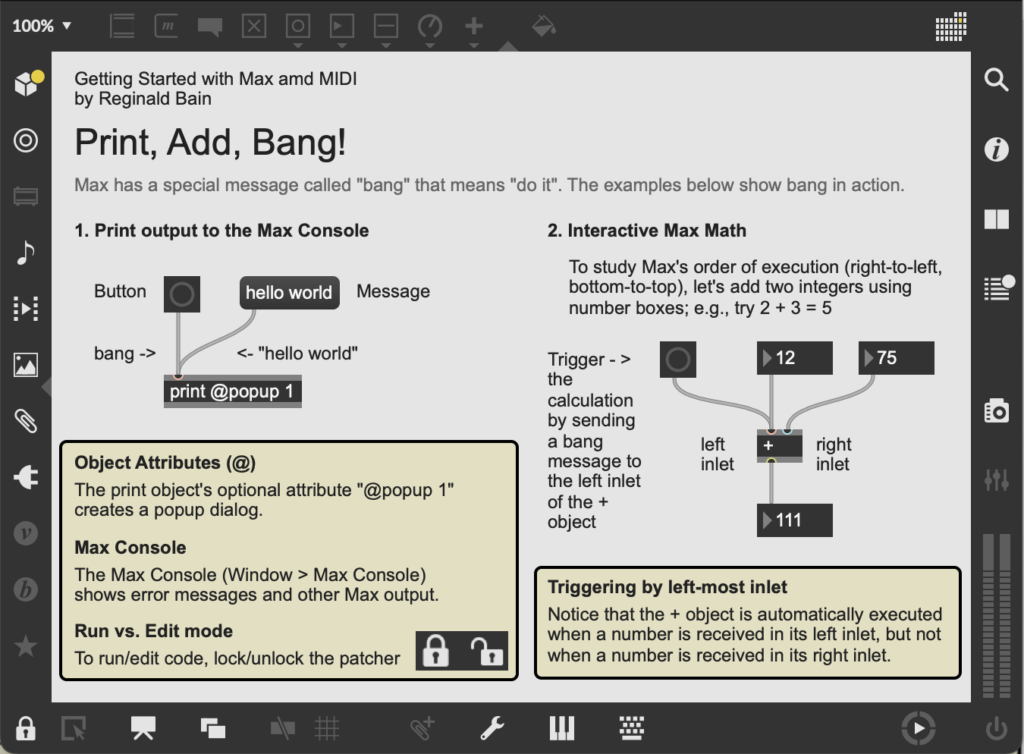
Printing output to the screen
Computer programming languages traditionally have an
object, or function, called print that display
a program's output to the computer's display. In
Max, the output is called print. The output of
the print object is displayed in the Max Console
(see Window > Max Console). As shown in this
patcher, the print object's output may be
redirected to a popup window by using the '@popup'
attribute.
Triggering by left-most inlet
Max has a wide variety of mathematical objects
including: +, -, *, /,
>, and <. In order to perform the
addition operation in this patcher, we need to
understand that Max objects are triggered when
they receive 'bang', or data, in their left-most
inlet. As shown in the patcher above, adding two
numbers together using number boxes is a great way to
explore these ideas. The + object only
calculates the correct result when it receives a bang,
or data, in its left inlet.
Objects
Max Tutorials
- Max Basic Tutorial 1: Hello
- Max Basic Tutorial 2: Bang!
- Max Basic Tutorial 3: Numbers and Lists
- Max Basic Tutorial 6: Simple
Math in Max
Further Reading
Updated: 9/22/25