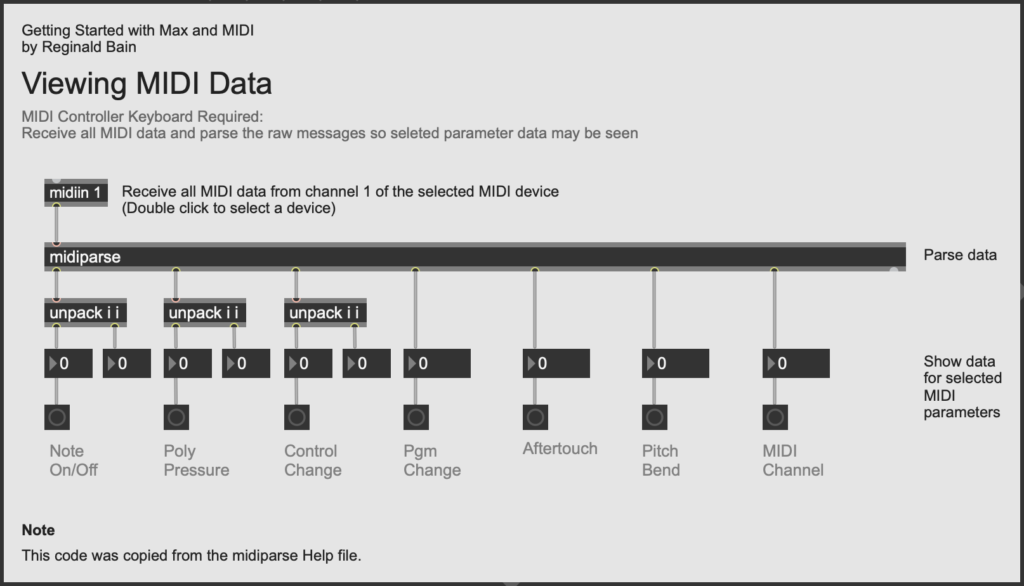
Description
In the previous patcher (02a_Notein), we examined the
output of the notein object. We added three
number boxes below notein – one box for each
of its three outlets. This allowsus to see the pitch,
velocity, and channel data in real time when we strike
a key on our MIDI controller. If we want to explore
other types of MIDI note data in real time we can use
the midiparse object. As you can see in the
patcher above, this object is capable of showing much
more than pitch, velocity, and channel data.
Be sure to notice that here we use the midiin
object, rather than the notein object so we
have access to all incoming MIDI data – not just
pitch, velocity, and channel.
If you'd like to learn more about the MIDI parameters
at the bottom of the patcher, visit Sweetwater's InSync
Glossary: MIDI Note
On/Off, Control
Change (CC), Program
Change, Aftertouch,
Pitch
Bend, MIDI
Channel. For general information about MIDI, see
Ch. 3 MIDI of Hass 2025.
Objects
References
Hass, Jeffrey. 2025. "Chapter Three: MIDI Overview and History." In Introduction to Computer Music: An Electronic Textbook. Available online at: <https://cmtext.com/MIDI/chapter3_MIDI.php>.
Sweetwater, In-Sync: Glossary. Available online at:
<https://www.sweetwater.com/insync/category/glossary/>.
Updated: 9/22/25