Description
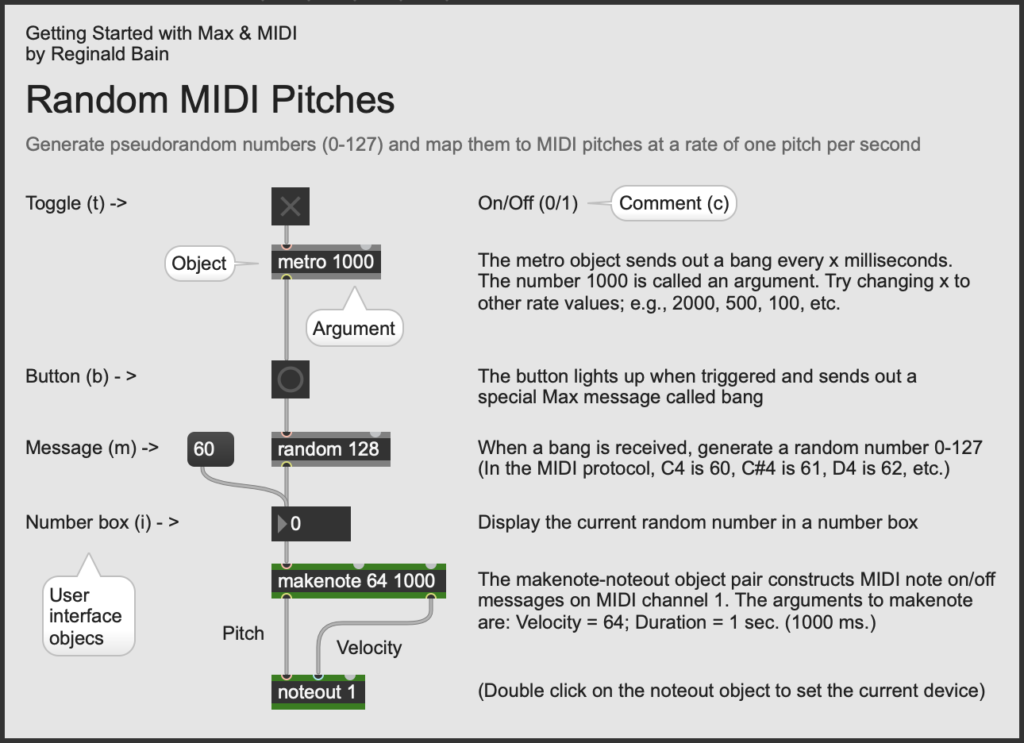
We begin our Max journey by generating random pitches. That is to say, let's generate a sequence of random numbers at a constant rate and map those numbers to MIDI pitches in real time. Max programs are created by connecting objects together using patch cords, so we need to figure out what objects are required to make this happen. Once we have a sufficient repertoire of Max objects under our control, we'll be able to generate music from random numbers.To establish a steady beat, we use a metro object. Metro is short for metronome. The metro object's '1000' argument tells Max to send a 'bang' (a special Max message that means 'do it') out its outlet every 1000 milliseconds. The regular pulse metro creates is displayed using a button object. To turn the metro object on and off, we use a toggle object. The toggle sends a '1' = on or '0' = off message into metro's left inlet.
We can generate a pseudorandom number using Max's random object. Since MIDI pitch numbers range from 0-127, we use the argument '128'. This will produce a range of random numbers from 0-127, inclusive. We then display the output of the random object in a number box user interface (UI) object.
Finally, we the feed the steady stream of numbers into the left inlet of a makenote-noteout object pair that generates MIDI note on/off messages our synthesizer understands. The noteout object sends the MIDI performance data out to our synthesizer. Notice that the makenote object has two arguments: Velocity = '64'; and Duration = '1000'. The duration argument is set to match the rate of the metro object. The velocity is set to the middle of its range ( 1-127).
Max Object Reference
Max Documentation
- Max 9 Documentation {C74}
Max Tutorials
- Cycling ’74, Max Basics Tutorials {C74}
Further Study
- Wikipedia, Pseudorandomess
Updated: 9/22/25